FAQ and warranty
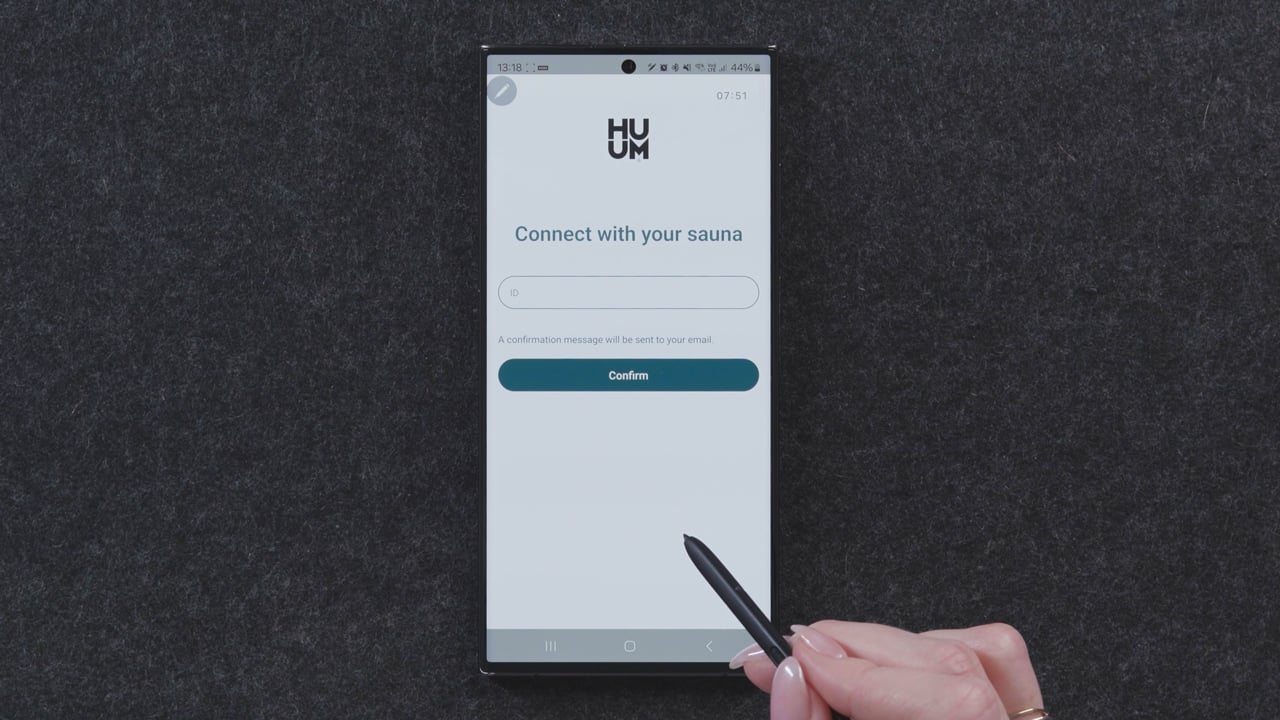
If you have a UKU Local control system but wish to upgrade to Wi-Fi connectivity, this can be done through the HUUM mobile app. The upgrade does not require calling a technician. First, you have to connect the UKU control system to the Wi-Fi network as described before and then install HUUM Mobile app and create an account. All further instructions are given in the mobile application.
- Press and hold the UKU control panel’s button for 9 seconds to access the settings menu (you’ll first see the timer menu, but keep holding until you reach the settings menu).
- Select “Wi-Fi settings” and then go to “SSID.”
- Choose the correct Wi-Fi network from the list.
- Enter the network password (ensure the name and password are each no longer than 20 characters, and password contains no spaces).
- Click “Connect” and follow the on-screen instructions to complete the setup.
Creating an account:
Connecting your sauna:
It is recommendable to use round stones in HUUM sauna heaters. Round stones complement the design of the heaters and provide milder steam. Our product range includes round olivine diabase sauna stones and are sold in packs weighing 15 kg.
NB! Choose stones that are specifically meant for use in sauna heaters, and avoid decorative stones as they may break easily.
- Wash the stones under running water to remove dust before use.
- Lay the stones one by one. Don’t pour or throw them into the heater!
- Start with larger stones at the bottom and sides, then use smaller stones to fill gaps. Lay the stones tightly but leave space for air circulation.
- Cover the outer surfaces of the heater tightly, ensuring the heating elements are not visible. Exposing them to water shortens their lifespan and creates excessively sharp heat.
- To ensure optimal performance, regularly check the heater stones:
→ After 100 hours of use (or at least once a year), perform a visual inspection.
→ After 200 hours of use, rearrange the stones and replace any that have cracked.
→ After 400 hours of use, replace all stones for the best steam and sauna experience.
Heating elements require replacement only when they are broken. Remove some stones from the sauna heater to verify that all the heating elements are in proper working order. If the heating elements do not turn red, they are likely damaged and must be replaced.
You will find your Sauna ID and code from the front cover of the UKU main module. Sauna ID’s location is marked with yellow.
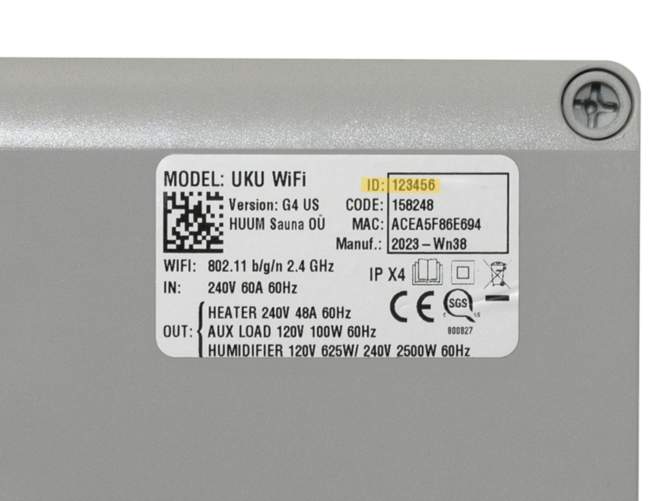
In case you do not have access to the main module, please go to your display unit and open the settings menu. You can reach the settings menu by holding down the display unit button for around 6 seconds. At first, you will reach the timer. Please keep holding the button until you are on the menu. From there, choose “Controller info”. There, you should see the IMEI or MAC code, which you can forward to HUUM support.
An extension box is required for heaters with a power output exceeding 18kW because the current needed by the heater exceeds the standard load limits. The extension box helps distribute the load and allows for the management of higher currents, ensuring safe and efficient operation. Without an extension box, the electrical system could overheat or become overloaded, posing a risk to both the heater and the overall reliability of the electrical network. Extension box is not allowed to use with a single-phase connection.
With a three-phase connection you will need an extension box with over 18kW heaters.
Spare parts for HUUM sauna heaters are available from our authorized distributors.
Contacts of all shops, e-stores and sauna building companies that sell HUUM sauna heaters are provided on page “Find a store”.